Between Prompts for Date Columns
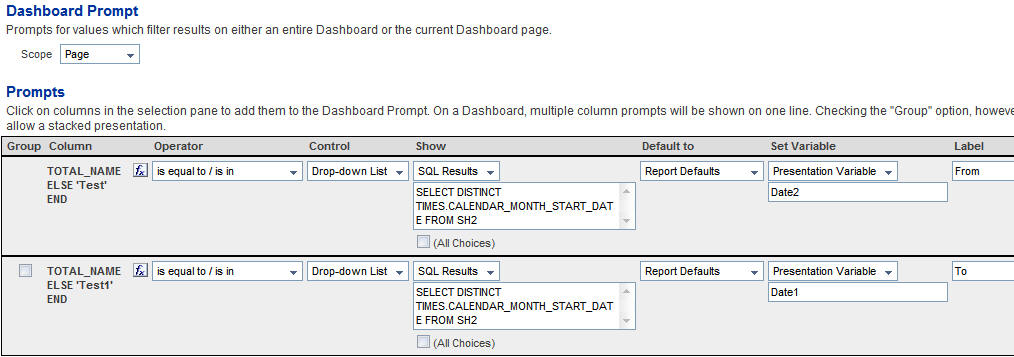
Say you need a report containing Start Date, Sales and Number of Days where Number of Days is the number of days between the values chosen in the dashboard prompt, to achieve this using Presentation Variables. This is a variation of the approach that we saw earlier here. Lets start with creating a dashboard prompt. This dashboard prompt shall contain 2 prompts on any column. For both the columns, in the formula tab enter the below formulas
CASE WHEN 1=0 THEN CHANNELS.TOTAL_NAME ELSE ‘Test’ END
CASE WHEN 1=0 THEN CHANNELS.TOTAL_NAME ELSE ‘Test1′ END
We have used the above formula in order to protect the columns from getting the filters. This is very important for setting presentation variables and at the same time not affecting any columns
Now, for both the prompts convert the Results to SQL Results and enter the below SQL
SELECT DISTINCT TIMES.CALENDAR_MONTH_START_DATE FROM SH2
In the above case, TIMES.CALENDAR.MONTH_START_DATE is my date column. Make both the above prompts to set 2 presentation variables Date1 and Date2.
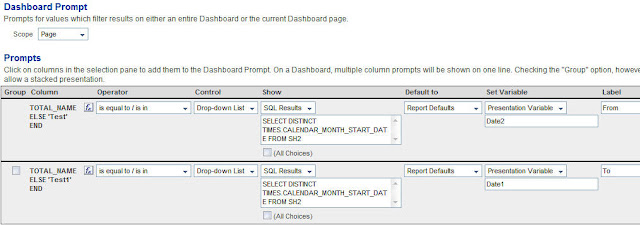
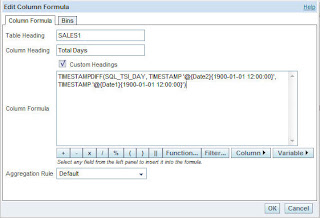
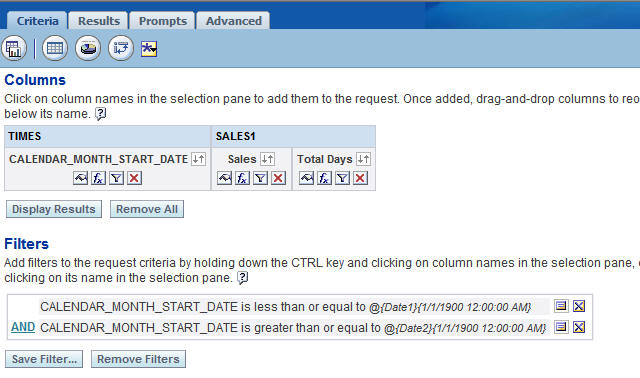
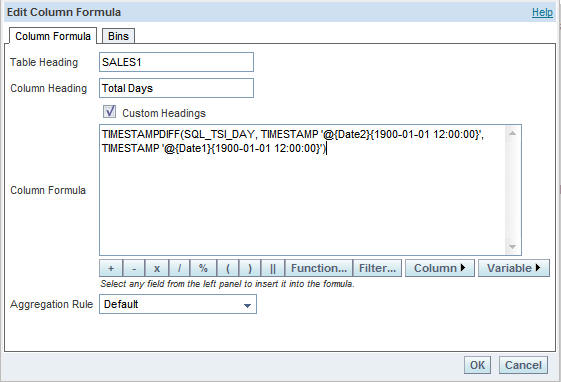
Save this prompt. Now go to Answers and start creating a report containing 2 columns, TIMES.CALENDAR_MONTH_START_DATE and SALES1.SALES. Now create another column with the following formula
TIMESTAMPDIFF(SQL_TSI_DAY, TIMESTAMP ‘@{Date2}{1900-01-01 12:00:00}’, TIMESTAMP ‘@{Date1}{1900-01-01 12:00:00}’)
So, what this does is, it calculates the time difference between the 2 dates which would be selected in the dashboard prompt.
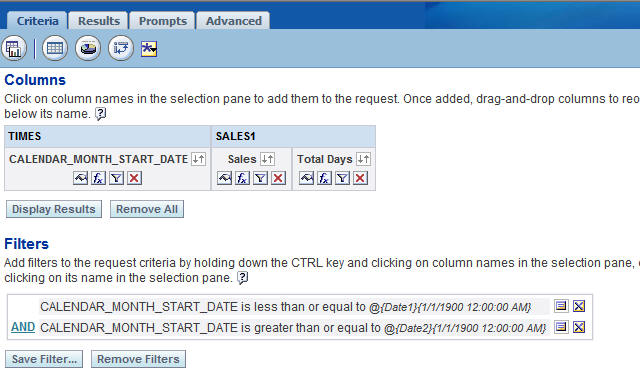
Add 2 filters to TIMES.CALENDAR.MONTH_START_DATE (one with less than or equal to and the other with greater than or equal to). In both the filters refer the Date1 and Date2 respectively.
CALENDAR_MONTH_START_DATE is less than or equal to @{Date1}{1/1/1900 12:00:00 AM}
CALENDAR_MONTH_START_DATE is greater than or equal to @{Date2}{1/1/1900 12:00:00 AM}
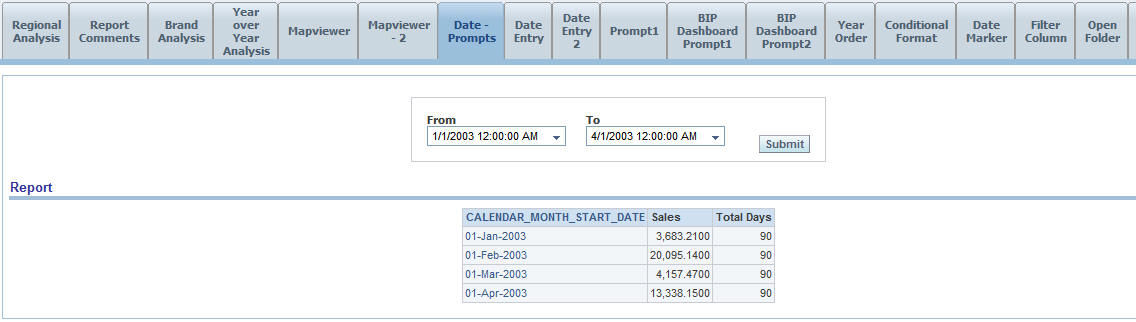
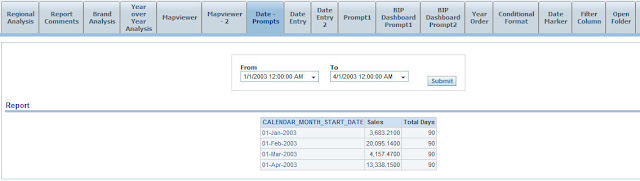
 Now, include both the Dashboard Prompt and the Answers request in the dashboard page. Now, you should see that as you change the 2 dates, the Number of Days in the report would change and also the filter would be applied accordingly.
CASE WHEN 1=0 THEN CHANNELS.TOTAL_NAME ELSE ‘Test’ END
CASE WHEN 1=0 THEN CHANNELS.TOTAL_NAME ELSE ‘Test1′ END
We have used the above formula in order to protect the columns from getting the filters. This is very important for setting presentation variables and at the same time not affecting any columns
Now, for both the prompts convert the Results to SQL Results and enter the below SQL
SELECT DISTINCT TIMES.CALENDAR_MONTH_START_DATE FROM SH2
In the above case, TIMES.CALENDAR.MONTH_START_DATE is my date column. Make both the above prompts to set 2 presentation variables Date1 and Date2.
Save this prompt. Now go to Answers and start creating a report containing 2 columns, TIMES.CALENDAR_MONTH_START_DATE and SALES1.SALES. Now create another column with the following formula
TIMESTAMPDIFF(SQL_TSI_DAY, TIMESTAMP ‘@{Date2}{1900-01-01 12:00:00}’, TIMESTAMP ‘@{Date1}{1900-01-01 12:00:00}’)
So, what this does is, it calculates the time difference between the 2 dates which would be selected in the dashboard prompt.
Add 2 filters to TIMES.CALENDAR.MONTH_START_DATE (one with less than or equal to and the other with greater than or equal to). In both the filters refer the Date1 and Date2 respectively.
CALENDAR_MONTH_START_DATE is less than or equal to @{Date1}{1/1/1900 12:00:00 AM}
CALENDAR_MONTH_START_DATE is greater than or equal to @{Date2}{1/1/1900 12:00:00 AM}